
Comebackby Tan Solutions
Shopify returns that start with an exchange
Comeback shows the buyer a swap first: another size or color, another product, or store credit. The refund stays available. It runs inside Shopify customer accounts, with no theme code.
What it does
Exchange first
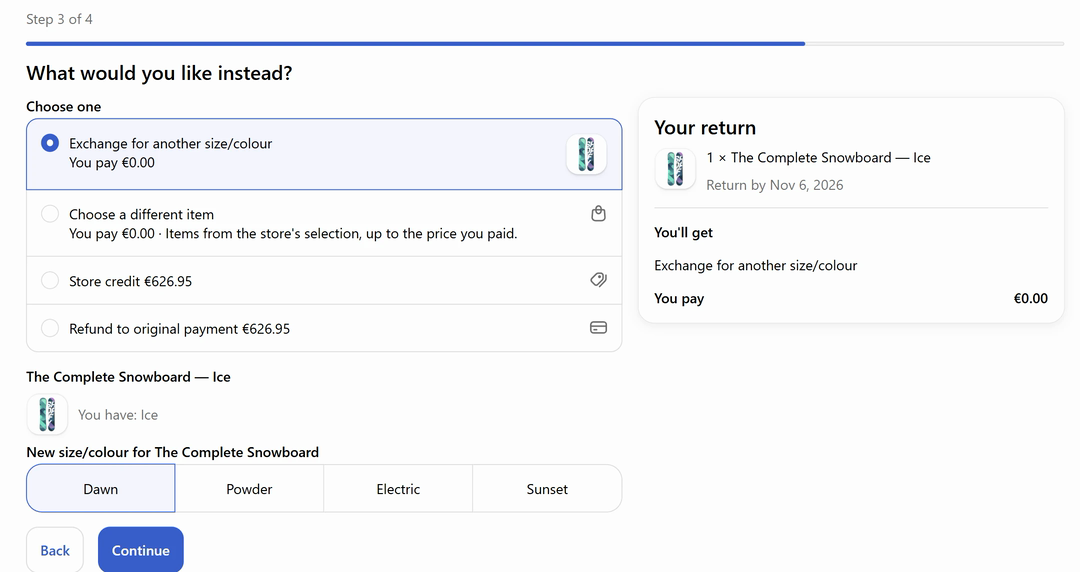
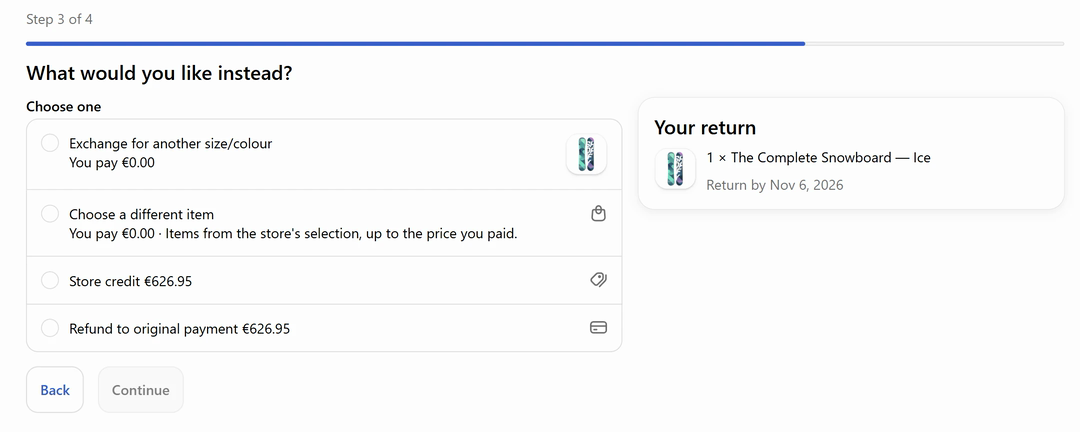
When a buyer starts a return, Comeback shows the swap first: another size or color of the same item, or another product. The buyer picks the new item before the refund comes up, and Shopify itself carries out the exchange in your store.
Store credit as a choice
If no swap fits, store credit is offered next, so the money stays in your store for the next order. The refund is still there as the last option. Nothing is hidden from the buyer, and you choose which options to show.
EU withdrawal button
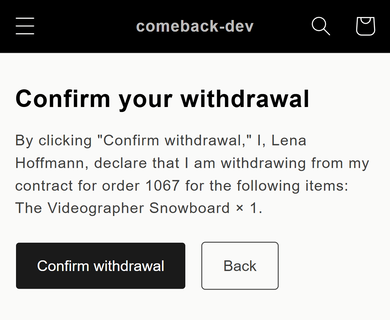
Buyers in the EU can withdraw from a purchase in two clicks, guest orders included, without creating an account. The request lands in the same queue as every other return. The button is free on every plan.
Who it is for
- Shopify stores that sell clothes, shoes or anything with sizes.
- Stores that sell into the EU.
- Teams that want one queue for every return.
How it works
- Install Comeback from the Shopify App Store. It adds its pages to Shopify customer accounts, so there is no theme code to edit.
- Choose which swaps to offer: other sizes and colors, other products, store credit. The refund always stays as the last option.
- Buyers start returns in their account. You see every request in one queue, approve it, and Shopify carries out the result.
Status and dates
| Status | On the Shopify App Store since 6 November 2026 |
|---|---|
| Where it lives | The Shopify App Store listing and comeback.tansolutions.org |
| Languages | The site and the help center are in English and German |
| Price model | Four flat plans, one of them free, billed through Shopify. No fee per return. |
| Runs in | Shopify customer accounts, with no theme code |
Related
Everything else about Comeback is on its own site: the one-minute film, pricing, guides and help.
- Watch the 1-minute filmThe real app in one minute: a return becomes a same-price swap, then your review queue.
- How it worksSetup, the buyer flow in Shopify customer accounts, and your review queue.
- PricingFour flat plans, one of them free, billed through Shopify. No fees per return.
- EU withdrawal buttonAn EU withdrawal button that also works for guest orders, free on every plan.
- GuidesFourteen sourced, dated guides to Shopify returns, exchanges and EU withdrawal.
- Comeback vs Loop, AfterShip, ReturnGO and RedoHow Comeback compares with four other Shopify returns apps, with sources and dates.
- Help centerEleven setup and troubleshooting articles, in English and German.
- Comeback auf DeutschThe German site: Umtausch statt Erstattung, the Widerrufsbutton and German guides.
Questions
Does it change my theme?
No. Comeback runs inside Shopify customer accounts, the account pages Shopify already gives your buyers. You add no theme code, and your theme stays as it is.
What happens to the refund?
It stays available. Comeback offers a swap first and store credit next, and the buyer can still choose the refund. Shopify itself carries out the exchange, the store credit or the refund.
Does the EU button work for guest orders?
Yes. Buyers in the EU can withdraw from a purchase in two clicks, including orders placed without an account. The button is free on every plan.
Where is the pricing?
On the Comeback site, at comeback.tansolutions.org/pricing. There are four flat plans, one of them free, all billed through Shopify, with no fee per return.
Is there a German version?
Yes. The Comeback site, its guides and its help center are in English and German, including a German page on the Widerrufsbutton.
How do returns work in your store today?
Tell us what you sell, how often items come back and how you handle exchanges now. Please don’t send customer data or store credentials.